


If you’ve ever thought about building your own website but had no idea where to begin, this post is for you. We’re going to walk you through exactly how we built Crap Coffee, a global community platform for coffee lovers, using WordPress and AI assistance. We’ll cover what worked, what didn’t, how much it cost, how long it took, and whether we’d do it all again.
Spoiler: yes, we would. But we’d do a few things differently.
Why “Crap Coffee”?
Fair question. The name turns heads, and that’s exactly the point.
“Crap Coffee” isn’t about bad coffee. It’s about honest coffee. We were tired of the same polished, overhyped coffee content everywhere. The perfect latte art. The trendy third-wave cafés with a six-word menu and a two-hour wait. Real coffee culture is messier and more interesting than that.
The name is a conversation starter. It’s self-aware, a little cheeky, and it immediately tells you this isn’t another glossy coffee brand trying to sell you something. It’s a community. And communities need a bit of personality.
So What Actually Is Crap Coffee?
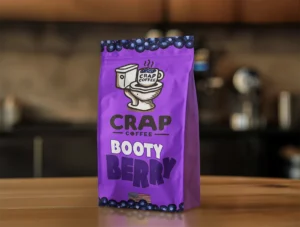
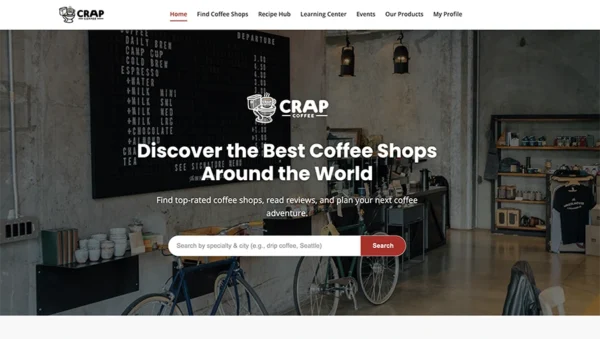
Crap Coffee is a community-driven coffee shop directory. Think of it as the antidote to overly curated review platforms.
Here’s what you can do on the site:
- Find coffee shops near you or anywhere in the world using an interactive map.
- Add coffee shops that aren’t listed yet. You probably know a hidden gem that deserves more love.
- Rate and review the places you visit, honestly.
- Share recipes with other coffee enthusiasts.
- Browse and join events in the coffee community.
- Build your own profile as a coffee lover.
It’s built by coffee people, for coffee people. No ads, no affiliate pressure, no algorithm pushing you toward whatever’s trending. Just real recommendations from real people.
Visit crap.coffee. The domain alone should tell you we mean business.
The Planning
Before a single line of code was written, we sat down and got clear on what the site actually needed to do. That clarity made everything easier later on.
The core requirements were straightforward. The site had to be community-first, not sales-first. It needed user accounts so people could add and review coffee shops. And it absolutely needed a map, because finding a coffee shop is fundamentally a location-based problem.
That map decision led to one of our first big choices: which mapping service to use? Google Maps was the obvious answer, but we ruled it out quickly. Google Maps is powerful and you can do a lot with it, but once you start attracting real traffic it becomes expensive. For a site that isn’t making money yet, that wasn’t an option. We went with OpenStreetMap instead. It’s free for basic use, it does exactly what we need, and when Crap Coffee is turning a profit we can always revisit. For now it works perfectly and costs nothing.
The other planning decision that shaped everything was how to handle the build itself. Neither of us are professional developers, but we do know a bit of HTML and CSS. We had a clear vision, we had WordPress experience, and we had AI in our corner. The question was whether that combination could actually produce something real and polished. It could. And it did.
Why WordPress
We’ve been using WordPress for years. That’s honestly the main reason we chose it for this project. We know how it works, we know how to edit it, add things to it, and maintain it. When something goes wrong we know where to look. That familiarity is worth a lot when you’re building something you actually want to finish.
Beyond personal experience, WordPress made sense for Crap Coffee on its own merits:
It’s free. The software itself costs nothing. You pay for hosting and your domain, that’s it.
It’s secure. WordPress has a huge security community behind it, regular updates, and excellent plugins like Wordfence that add serious protection without needing a developer.
It’s simple to manage. Adding pages, editing content, installing plugins, managing users. All of it is straightforward once you know your way around.
The plugin ecosystem is massive. Whatever functionality you need, there’s almost certainly a plugin for it. Security, SEO, caching, backups, contact forms. You name it.
It scales. Whether you have 100 users or 100,000, WordPress handles it.
In fairness, WordPress is not perfect. It can be bloated. It can be slow if you don’t set it up correctly. And occasionally it feels a little limited when you want to do something very specific. But for Crap Coffee, it just worked. And that matters more than anything else.
One more thing worth mentioning. We used AI to build a completely custom theme for the site from scratch. No premium theme purchased, no template license fees. Just us describing what we wanted and AI helping us build it. That alone saved us a minimum of $70 compared to buying a quality theme. The result is a site that looks exactly how we wanted it to look, because we designed every part of it ourselves.
What Did It Actually Cost?
This is the part most people skip over. We won’t.
Domain name: approximately $24 for two years. We actually own three versions of the domain (crapcoffee.shop, crapcoffee.store, and crap.coffee) but settled on crap.coffee as the primary one. The .coffee extension was too good to pass up for a coffee platform.
Hosting: already covered. We had a VPS hosting account running at around $70 a month that supports up to 6 websites. Crap Coffee slotted straight in alongside everything else we were already running. If you’re starting completely from scratch, that $70 a month is still a reasonable cost spread across multiple projects. Worth factoring in.
Custom theme: $0. As mentioned above, we built the theme ourselves with AI assistance rather than buying one.
Mapping: $0. OpenStreetMap is free for our use case. No API bills, no usage limits at our current scale.
AI assistance: $100 a month for Claude Max. Before that number puts you off: we use Claude for absolutely everything, not just this website. Work tasks, writing, research, problem-solving, and plenty of things that have nothing to do with Crap Coffee. It pays for itself many times over across everything we use it for. As a website build tool specifically it was transformative, but the cost is spread across a lot more than one project.
Total cost specific to this website: roughly $24. Everything else was absorbed into things we were already paying for or cost nothing at all. For a fully custom, community-driven platform with map integration and user accounts, that is remarkable value.
How We Used AI
AI wasn’t a magic button that built the website for us. It was more like having a very knowledgeable collaborator available at all times, one who could write code, explain concepts, review decisions, and help us think through problems we’d never encountered before.
Here’s how it actually looked in practice:
Building the custom theme. We described the look and feel we wanted and worked with AI to build every part of it. Page layouts, typography, color schemes, the coffee shop cards, the map integration. All of it came together through a back-and-forth process where we’d ask, review, tweak, and refine.
Writing code we couldn’t write ourselves. The OpenStreetMap integration, the user submission system for adding coffee shops, the search and filter functionality. This is the kind of code that would have taken weeks to learn from scratch or cost a significant amount to hire out. With AI assistance we worked through it step by step.
SEO and content. Every page on the site needed optimized meta descriptions written to specific character counts, avoiding the kind of bland marketing language that fills every other website. AI helped us write something better.
Decision making. When we weren’t sure whether to use a plugin or custom code for a particular feature, we’d talk it through. AI would lay out the options and tradeoffs. We made the final calls.
Troubleshooting. When things broke, and things did break, AI helped us diagnose and fix them. This was sometimes a slow iterative process, but we always got there.
We also used Claude Code, which runs directly in your computer’s terminal and is used for more hands-on coding tasks. That deserves its own dedicated post and it will get one. The short version is that once it’s set up, working with it feels just like chatting with regular Claude or ChatGPT. You describe what you want built, it builds it.
The AI Reliability Problem
This is something nobody in the AI space talks about honestly, so we will.
AI tools can be genuinely brilliant one day and noticeably worse the next. Every major AI company launches a powerful new model that feels like a supercomputer. Then, once large numbers of users pile in and the running costs balloon, the performance gets quietly dialed back. You go from feeling like you have the most powerful assistant imaginable to feeling like you’re working with a ZX Spectrum from 1984.
This was more common a few months ago but it still happens. And when it does, our advice is blunt: stop making changes to your project until it improves.
That is not an exaggeration. Using an underperforming AI to make code changes to your website can genuinely break things that were working fine. We experienced this. When you notice the quality has dropped, step away. Come back when it’s sharp again. The patience required will save you from a lot of very avoidable problems.
Crap Coffee Branded Coffee
This deserves its own section because it’s a real and serious part of where Crap Coffee is going, not an afterthought.
The community directory is the foundation. But the long-term vision includes selling Crap Coffee branded coffee beans under our own label, alongside branded merchandise. This is not a vague “maybe someday” idea. It’s the plan.
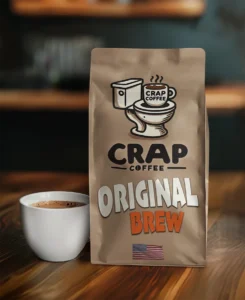
We’ve already used AI to create product mockup images(above), full packaging designs with branding and all, and they look genuinely great. You can see previews of them in the Our Products section of the site right now. The quality of what AI can produce for product visualization is extraordinary, and we’ll be publishing a dedicated post walking through exactly how we did it so you can apply the same process to your own project.
Our ambition doesn’t stop at an online store either. We want Crap Coffee beans on the shelves at Walmart. We want to be a fit for Spencer Gifts. That might sound bold for a site that isn’t making a penny yet, but you have to aim somewhere worth aiming at. Follow along and you’ll see exactly how we get there, or at least watch us try.
Was It Difficult?
Honestly, yes. Some parts were genuinely hard.
The design and build phase went well. We used Local WP, a free tool that lets you run a WordPress site on your own computer before it ever touches the internet. We’d strongly recommend this to anyone starting out. It means you can experiment freely and make mistakes without consequences. It also means you can tie Claude code into the folder on your desktop and code at will.
The harder parts were:
Moving to a live server. Getting a WordPress site from your local machine onto a real hosting account sounds straightforward. In practice there are database settings, domain configurations, file permissions, and security headers all ready to cause problems. We hit a situation where our server’s security settings were so restrictive they blocked the map from loading entirely. It took multiple rounds of troubleshooting to fix.
Security vs functionality. One of the most counterintuitive lessons from this whole build: locking a website down too tightly can break the features you worked hard to build. Getting that balance right takes time.
The iterative nature of building with AI. It is a conversation, not a command. Sometimes getting the right result takes several attempts. That can be frustrating. Knowing that going in makes it easier to handle.
The parts that were easier than expected: the design, the plugin setup, the SEO work, and the overall look of the finished site. We are genuinely proud of how it came out.
The Timeline
Here’s an honest breakdown of how long each phase took:
| Phase | Time |
|---|---|
| Concept and planning | 1-2 weeks |
| Local development, design and build | 6-8 weeks |
| Moving to live server and configuration | 2-3 weeks |
| SEO, content and plugin setup | 1-2 weeks |
| Ongoing fixes and polish | Continuing |
Total from initial idea to live site: roughly 6-9 months, working on it alongside other commitments rather than full-time. With dedicated focus you could move considerably faster. And remember, this was a few months ago now and with AI getting so much quicker and more accurate you can probably half that timeline now.
Want to Build Your Own? Here’s Where to Start
If any of this has made you want to try something similar, here’s a practical starting point:
1. Get clear on what you’re building. What does the site do? Who is it for? What do users actually do on it? Answering these questions clearly before you start will save you enormous amounts of time.
2. Install Local WP. It’s free. It runs WordPress on your computer. Build there first before worrying about live servers or hosting.
3. Use AI to help with the theme. Describe the look and feel you want. Work through it iteratively. You can build something genuinely custom without spending money on a premium theme.
4. Use AI as your collaborator throughout. Not to do everything for you, but to help you think, write code, troubleshoot, and make decisions. And remember: on the days when it seems off, walk away and come back later.
5. Keep your plugin stack lean. A solid starting set for any WordPress site: Wordfence for security, Rank Math for SEO, UpdraftPlus for backups, WP Super Cache for speed, and Really Simple SSL for your security certificate.
6. Budget time for the server move. It will take longer than you think. That’s normal. Go slowly and methodically.
7. Launch before it’s perfect. It will never feel completely ready. Ship it anyway.
Come Find Your Next Favorite Coffee Shop
While you’re thinking about your own project, come and see what we’ve built.
Head over to crap.coffee and:
- Search for coffee shops in your city or anywhere in the world.
- Add a shop that isn’t on the map yet.
- Leave an honest review of somewhere you’ve been.
- Share a recipe with the community.
- Check out the product previews in Our Products.
The more people who add shops, leave reviews, and share things, the better the platform gets for everyone. If you’re a coffee person, we’d love to have you as part of it.
Final Thoughts
Building a website from scratch with no development background is absolutely achievable in 2026. The combination of WordPress and AI assistance genuinely changed what’s possible for people who have a clear idea and the willingness to work through problems.
It is not always easy. There will be moments of real frustration. Things will break at inconvenient times. AI will occasionally let you down on the days you need it most. But the end result is something you fully own, fully understand, and can be genuinely proud of. The knowledge you pick up along the way doesn’t go away either.
We built Crap Coffee because we love coffee and we wanted something honest in a space full of noise. We built it ourselves because we could, and because doing it that way meant every decision was ours. That feels good.
More posts are coming. Claude Code, product mockup creation with AI, the branded coffee journey, merchandise, and everything in between. Stick around.
⊕ Read more AI inspired posts on our AI Blog
⊕ Check out the latest AI News
About the Author: Gavin Stacey

[…] Used for: Crap Coffee […]