We promised this post back in April. Here is the complete process behind five live projects, from the first flicker of an idea to a site indexed by Google.
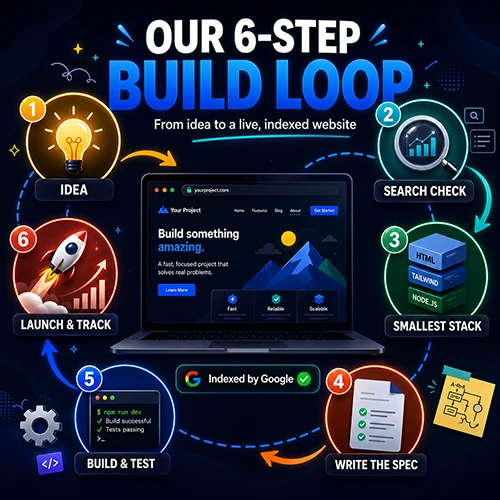
Every project we have shipped follows the same six steps. The idea has to annoy us personally. We check search demand before writing code. We pick the smallest stack that does the job. We write a full technical spec before opening a terminal. We build in phases and test each one. Then we get it live, indexed, and tracked in the same session. That is the entire method. No secret sauce, no magic prompt, just a loop we run every time.
We Owe You This One
At the bottom of our Hot Tip Calculator post we wrote that more posts were coming covering the full workflow, how we approach new ideas, and what we are building next.
That was April. It is now July, and in the meantime we have shipped two more projects and never written the post. So here it is.
This is not a tutorial on installing anything. There are plenty of those. This is the actual sequence we run, including the parts that are boring, the parts that are unglamorous, and the parts where the whole thing still goes sideways.
Step One: The Idea Has to Annoy Us First
Every single project on this site started as a personal irritation. Not a market analysis. Not a trend report. An actual moment where something was worse than it needed to be.
We were logging into seven separate Google Analytics accounts every morning, one after another, and it made us want to throw a laptop across the room. That became LivePeeker.
We were sitting in front of a bill doing quiet mental arithmetic and second-guessing the number. That became the Hot Tip Calculator.
We looked at where people share paranormal sightings and found scattered forums, buried Reddit comments, and Facebook groups where every blurry photo gets the same two replies. That became a platform with credibility scoring and a forensics toolkit called Paranormal Events Tracker.
If you have to convince yourself the problem is real, it probably is not. The good ideas arrive pre-convinced, because you have already lived the frustration a hundred times.
The practical version of this rule is simple. We keep a running note of things that annoyed us during the week. Most of them are nothing. Every so often one of them keeps showing up, and that is the signal.
Step Two: The Search Check Before the Code
This is the step most people skip and it is the one that has mattered most.
Before writing a line of anything for the tip calculator, we checked the search volume. The phrase “tip calculator” was sitting somewhere between 100,000 and 1,000,000 monthly searches with low competition. We also checked “tip suggestion” separately and found the three-month change on that phrase was plus 900 percent.
That told us two things. People want this. And the door is not closed.
Then we registered a domain with both words in it, because for a brand new site with no authority, an exact-match domain is one of the few advantages you can simply buy.
The same check is what kept us honest on our Livepeeker SaaS project. We asked four questions before committing: is the API free, is there real demand, can we charge for it, and can we actually build it with the skills and infrastructure we already have. The Google Analytics Data API turned out to cost nothing per request, which meant our cost of goods sold would be close to zero and every subscriber would be nearly pure margin. Comparable tools charge $30 to $300 per month. That gave us room to undercut and still be profitable from the first customer.
Spend one afternoon with a spreadsheet before you spend a month with a code editor. Search volume, competition, what similar tools charge, what the API costs you per request. If any of those answers makes you wince, you have just saved yourself weeks. This is the cheapest step in the whole process and it kills the worst ideas before they cost you anything.
Step Three: Pick the Smallest Stack That Works
Once we know what we are building, we choose the least amount of technology that can deliver it.
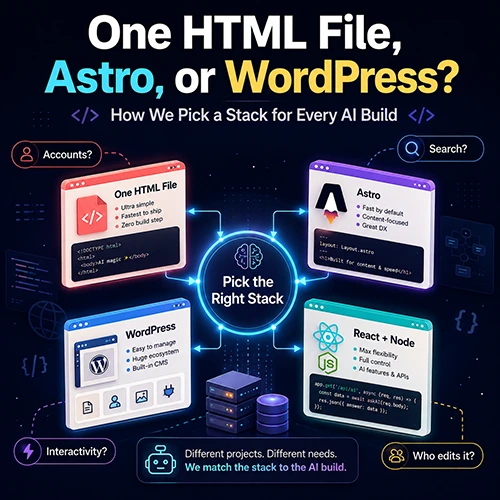
The tip calculator is one HTML file. No database, no plugins, no content management system, no theme license, no monthly platform fee. You could read the entire codebase start to finish in about twenty minutes. It loads instantly and works perfectly on a phone.
The paranormal sightings platform runs on Astro, because it has hundreds of mostly static pages with dynamic features layered on top. Pages that do not need JavaScript ship without it. Pages that do get exactly the interactivity they need.
The Livepeeker dashboard product needed real accounts, real payments, and real-time data, so it got a real application stack: React with Vite and Tailwind on the front, Node and Express on the back, MySQL, Socket.IO for live updates, Stripe for billing.
What we deliberately avoided on that last one is worth naming. No Redis. No Docker in production. No Kubernetes. No microservices. One process, one database, one server. For an MVP serving zero to a few hundred users, that is genuinely all you need.
We nearly set up an external database on Neon and Redis on Upstash before realising our existing hosting plan already included MySQL. Every external service is another account, another bill, and another thing that can break at 2am.
We wrote a whole separate piece on how we make this call. If you want the full decision tree, read One HTML File, Astro, or WordPress.
Step Four: Write the Spec Before You Open the Terminal
This is the single highest-leverage habit we have picked up, and it took us a few projects to learn it properly.
Before any code gets written, we use Claude in the browser to plan the architecture and produce a full technical specification. Not a paragraph of intent. An actual document covering file structure, database schema, API routes, every feature, environment variables, deployment notes, and on the SaaS build even the Terms of Service and Privacy Policy.
Then that spec gets handed to Claude Code to build from.
It sounds like bureaucracy. It is the opposite. A spec is a conversation with your future self about every decision you would otherwise have to make under pressure while debugging at midnight. When the plan is detailed, the build has no ambiguity. Nobody is asking what an endpoint should return, because the document already said.
The dashboard MVP came out at 47 source files, built in nine phases executed in order: foundation, authentication, property management, the real-time engine, dashboard UI, features, billing, landing page and legal, then polish and deploy.
Hours spent on the spec save days on the build. Plan in a chat window where you can think out loud and argue with yourself, then hand the finished document to the terminal. Two different tools, two different jobs. Do not try to design the whole architecture conversationally while code is already being written.
Step Five: The Build Session Itself
The terminal tool runs in your command line and you work with it conversationally, exactly like chatting in a browser. You describe what you want, it builds, you review, you refine.
Three things make that loop fast.
Build in phases and test each one. Do not build nine phases and then start testing. Finish authentication, confirm you can actually log in, then move on. Every phase we shipped needed testing, debugging, and iteration. Pretending otherwise would be dishonest.
Know what you want before you start. The back and forth is quick when you can answer questions immediately. It grinds when you are designing the product live in the chat. That is what step four is for.
Review what comes back. This is assisted development, not automated development. The code is good. It is not automatically correct for your situation, and you are the one who has to live with it.
The calculator went from blank page to live site in under 24 hours, and that included the design, all the logic, nine service categories, an international reference covering eighteen countries, a currency selector, bill splitting, and a complete Spanish translation with hreflang tags implemented properly on both versions. We are still slightly surprised by that one.
Step Six: Live, Indexed, and Tracked in the Same Window
A build that is not live is not finished. We treat deployment as part of the same session, not a separate project for next weekend.
For the calculator, the site went live on its own domain, running on HTTPS, indexed by Google, and reporting into Google Analytics inside the same 24 hour window as the build.
There is one enormous exception to this and it deserves its own warning. If your project touches sensitive Google OAuth scopes, verification will take weeks. Ours took three weeks and three attempts. The first submission was rejected because our demo video showed the returning-user flow instead of the first-time consent screen. The second was rejected because the privacy policy did not explicitly state who we share, transfer, or disclose user data with. The third was approved.
That meant a fully built, fully deployed product sat behind a red “Google hasn’t verified this app” warning for three weeks while nobody could use it.
Start any external verification, review, or approval process the moment you have a working login flow, not on launch day. Google’s reviewers will find something to send back at least once, and every round trip is another week of a finished product nobody can reach.
What This Process Is Still Bad At
Honest pass, same as we do on every build log.
It does not validate demand, only feasibility. The search check tells you people are looking. It does not tell you they will pay. We got lucky that the dashboard idea was sound. A landing page with a waitlist would have told us before we spent weeks building.
It makes shipping so cheap that you ship things you should not. When a project costs one domain and a day, the bar for starting drops through the floor. That is mostly good. It also means you can end up maintaining five things when you should be improving one.
It does nothing for marketing. Building is now the easy part, which is a genuinely strange sentence to write. Our Product Hunt launch landed at position 417 with one upvote and one comment. The product worked perfectly. Nobody knew it existed.
Environment problems still eat days. We built on a 2017 iMac and lost hours to Docker and MySQL issues that had nothing to do with the actual product. Know your machine’s limits before you plan your stack.
Run the Loop
That is the whole method. Get annoyed by something real. Check whether anyone else is looking for it. Pick the smallest stack. Write the plan. Build in phases. Get it live the same day.
None of these steps are clever. The advantage is not in any individual step, it is in running all six every time instead of skipping to the fun one.
Five projects in, it is still working.
- Build what annoys you. Every project here started as a personal frustration, not a market opportunity. The ideas that survive are the ones you have already lived.
- Check search demand before you build. One afternoon of keyword research and competitor pricing kills the bad ideas for free.
- Smallest stack that works. One HTML file beat a full platform for a calculator. Match the tool to the job, not to your ambitions.
- Plan in the browser, build in the terminal. A detailed technical spec is the single best thing you can hand to AI-assisted development.
- Test every phase, not just the finished thing. Nine phases built and tested in order beats nine phases built and then debugged all at once.
- Deploy in the same session. Live, HTTPS, indexed, and tracked before you close the laptop. A build sitting on your machine is not a project.
- Start verification early. Anything requiring external approval should begin the day the login works, not the day you launch.
- Building is now the easy part. Distribution is the hard part, and no workflow fixes that for you.
⊕ Read more AI inspired posts on our AI Blog
⊕ Check out the latest AI News
About the Author: Gavin Stacey