

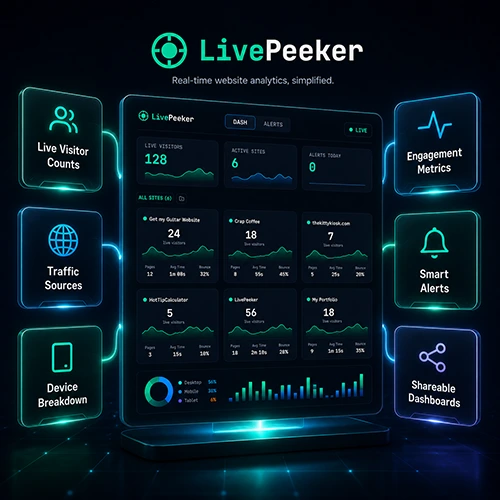
From seven logins to one screen. The full story of building a SaaS with AI, surviving Google’s OAuth verification, and launching on Product Hunt.
We got tired of logging into seven separate Google Analytics accounts every morning. So we built LivePeeker, a real-time dashboard that pulls live visitor data from every GA4 property you own and puts it all on one screen. Alerts, TV mode, shareable client links, the whole thing. Built with AI assistance, launched on Product Hunt, and verified through Google’s OAuth gauntlet. Here is everything: the good decisions, the painful ones, and the advice we wish someone had given us before we started.
The Problem That Started Everything
We run multiple websites. Seven of them, all on separate Google Analytics accounts. Every morning the same ritual: open GA4, check one site, log out, log into the next, check it, log out, repeat. Seven times. Every single day.
It is not that any one login is hard. It is that doing it seven times makes you want to throw your laptop. And if you want to compare traffic across sites? Forget it. You are flipping between tabs trying to remember what the number was on the site you checked three logins ago.
We looked at the existing tools. Geckoboard, Klipfolio, AgencyAnalytics. They exist. They are also bloated, expensive, and built for enterprise teams with dashboards full of widgets nobody looks at. We did not want forty widgets. We wanted one screen that shows every site, live, right now.
So we built it.
Why We Thought This Could Be a Business
Before writing a single line of code, we sat down and asked the hard questions. Not “can we build this” but “should we build this.” We have made the mistake before of building first and validating later. This time we wanted to know the answers up front.
Is the API free? Is there real demand? Can we charge for it? Can we actually build it?
Is the API free? Yes. Google’s GA4 Data API, including the Realtime endpoint, costs nothing. Zero per-request billing. The only constraint is quota limits per property, which are generous. That meant our cost of goods sold would be essentially zero. Every subscriber would be nearly pure margin.
Is there real demand? Anyone managing multiple client sites has this problem. Agencies, freelancers, multi-brand companies. That is not a niche. That is a category.
Can we charge for it? Comparable tools charge $30 to $300 per month. We could undercut significantly with a focused, simpler product at $29 per month and still be profitable from subscriber number one.
Is the build manageable? The core is OAuth plus a polling loop plus a clean dashboard. No AI models, no massive team, no funding required.
The economics checked out. We moved forward.
Do not skip validation. Spend an afternoon with a spreadsheet before you spend a month with a code editor. Ask yourself: is the API free or paid? Who exactly will pay for this? How much do competitors charge? Can I actually build it with my current skills and infrastructure? If any answer makes you wince, rethink the idea before you commit.
Choosing the Stack
We went with what we knew and what our hosting could handle:
- Frontend: React with Vite and Tailwind CSS
- Backend: Node.js with Express
- Database: MySQL on Hostinger (production), SQLite locally
- Realtime: Socket.IO for pushing live updates to the browser
- Scheduling: node-cron for polling GA4 every 60 seconds
- Auth: Google OAuth 2.0 with Passport.js
- Payments: Stripe
- Hosting: Hostinger Business plan
We deliberately avoided overengineering. No Redis. No Docker in production. No Kubernetes. No microservices. One Node.js process, one MySQL database, one server. For an MVP with zero to a few hundred users, that is all you need.
Use what you already pay for. We almost set up external databases on Neon and Redis on Upstash before realizing our Hostinger plan already included MySQL. Every external service is another account to manage, another thing that can break, and another bill. Keep it simple until complexity is forced on you by success.
The Build Process
We used Claude to plan the architecture and write the full technical spec, then handed it to Claude Code to build. The spec covered everything: file structure, database schema, API routes, the polling engine, all features, environment variables, deployment notes, even the Terms of Service and Privacy Policy.
Claude Code built the entire MVP across 47 source files. Nine phases, executed in order.
- Foundation (project structure, database, config)
- Authentication (Google OAuth, JWT, session management)
- Property Management (discover and connect GA4 properties)
- Realtime Engine (polling, snapshots, Socket.IO)
- Dashboard UI (cards, sparklines, source bars, drag and drop)
- Features (TV mode, alerts, shareable links)
- Billing (Stripe subscriptions, webhooks, plan enforcement)
- Landing Page and Legal (homepage, terms, privacy policy)
- Polish and Deploy (responsive, error handling, loading states)
It was not magic. Every phase needed testing, debugging, and iteration. But having a comprehensive plan meant Claude Code knew exactly what to build and in what order. No guessing, no scope creep, no “what should this endpoint return?”
Write the plan before you write the code. We spent hours on the technical spec and it saved us days on the build. A detailed spec is not bureaucracy. It is a conversation with your future self about every decision you will otherwise have to make under pressure while debugging at midnight.
The Features That Matter
The Dashboard. Every connected site gets a card showing live visitor count, a sparkline trend, traffic source breakdown (Direct, Organic, Social, Referral), top countries, top pages, device split, and a percentage-of-peak indicator. All updating in real time via WebSockets.
TV Mode. Full-screen, auto-rotating display that cycles through each site one at a time. Designed for office monitors. Click a button, walk away, let it run. Clients love seeing their traffic on the big screen.
Spike and Drop Alerts. Set thresholds and get notified when traffic surges or tanks. If your site suddenly gets 4x normal traffic, you want to know. If it drops to zero, something might be broken. These run inside the existing polling loop, so they cost zero additional API calls.
Shareable Links. Generate a read-only URL that anyone can view without logging in. Give it to a client so they can watch their own traffic live. Optional password protection and expiry.
None of these features cost us anything extra in API usage. Alerts evaluate data we already fetched. TV mode is just CSS. Shared links serve cached data. The Google API bill remains zero.
The Google OAuth Verification Saga
This was the part nobody warns you about.
When your app uses Google’s analytics.readonly scope, every user sees a terrifying red warning screen saying “Google hasn’t verified this app.” It looks like a virus warning. Nobody will click through that.
To remove it, you submit your app for Google’s OAuth verification. Sounds simple. It was not.
| Attempt | What happened | The fix |
|---|---|---|
| Attempt 1 | Rejected. “Your demo video does not show the OAuth consent screen workflow.” We were a returning user so it showed the simplified flow, not the first-time consent screen. | Revoked our own access, re-recorded showing the fresh first-time consent flow, clicked “4 services” to expand the permissions list. |
| Attempt 2 | Rejected again. “Your privacy policy does not state with whom you share, transfer, or disclose Google user data.” | Added a comprehensive data sharing section explicitly listing every prohibited use and naming the only two third parties that touch any data. |
| Attempt 3 | Approved. | Three weeks from first submission to green light. |
Three weeks where we had a fully built, fully deployed product that nobody could use because of a red warning screen.
If your app uses any Google sensitive or restricted OAuth scopes, start the verification process the moment you have a working login flow. Do not wait until launch day. You will need a privacy policy that explicitly covers data collection, usage, sharing, retention, and deletion. You will need an unlisted YouTube video showing the complete first-time OAuth consent flow. And you will need patience, because Google’s reviewers will find something to send back at least once.
The Pricing
We kept it straightforward:
| Plan | Properties | Price |
|---|---|---|
| Free | 1 | $0 |
| Starter | 5 | $29/mo |
| Pro | 15 | $79/mo |
| Business | 25 | $149/mo |
| Enterprise | 25+ | Custom |
The free plan gets people in the door. One site is enough to see how it works and decide if it is worth paying for. The jump to Starter gives you five sites and faster updates, which covers most freelancers.
Give away enough to be useful, but not so much that people never need to upgrade. One free site is the sweet spot for us. Two would have covered most casual users and killed conversion.
Launching on Product Hunt
We scheduled the launch for a Wednesday morning. Prepared screenshots with demo data, wrote a maker comment explaining the problem we solved, added shoutouts to Claude, Stripe, and Google Analytics.
The result: flat. Position 417. One upvote. One comment.
Honest take: Product Hunt is not what it used to be. The platform is saturated with AI wrappers, and organic discovery is extremely difficult without an existing audience to rally upvotes. We do not regret doing it, because the permanent page adds credibility, but it is not a growth engine.
Do not pin your launch hopes on Product Hunt alone. The real growth channels for niche SaaS are content marketing (write about the problem your product solves), community engagement (Reddit, Discord, Slack groups where your users hang out), and direct outreach to people with the exact pain you fix. One paying customer from a Reddit thread is worth more than 500 Product Hunt upvotes.
What We Would Do Differently
Start OAuth verification earlier. We had a finished product sitting behind a warning screen for three weeks. If we had started the process during the build, it would have been approved by launch day.
Test on the target device sooner. We built on a 2017 iMac and hit issues with Docker and MySQL that ate hours. Know your development environment’s limitations before you plan your stack.
Write the privacy policy first, not last. Google’s verification team scrutinizes every sentence. We rewrote ours three times. Having the final version ready before submitting would have saved two rounds of back and forth.
Build the landing page before the app. A landing page with a waitlist would have told us whether people cared before we spent weeks building. We got lucky that the idea was sound, but we could just as easily have built something nobody wanted.
Where LivePeeker Is Now
Where it works:
- Replaces the seven-login morning ritual entirely. One glance, all sites, done.
- Google OAuth verified. Clean, professional login flow. No scary warning screens.
- Alerts fire when traffic spikes or drops. We have caught site issues before our visitors noticed.
- TV mode looks genuinely impressive on a wall-mounted monitor.
- Shareable links let us give clients a live view without giving them a login.
Where it does not (yet):
- No public status page. It is on the roadmap.
- No mobile app. The web dashboard works on phones but a dedicated app would be better.
- Marketing is still early. The product works. Now we need people to find it.
Try LivePeeker
The dashboard is live at livepeeker.com. Connect your Google Analytics, add your sites, and see all your traffic on one screen. The free plan covers one site and takes about thirty seconds to set up.
If you manage multiple websites and you are tired of the GA4 login shuffle, this is what we built it for.
- Validate before you build. Check the API costs, the competitive landscape, and whether anyone will actually pay. An afternoon of research saves a month of wasted effort.
- Use what you already have. Existing hosting, existing databases, existing accounts. Every new external service is complexity you do not need yet.
- Plan the build in detail. A comprehensive technical spec is the best thing you can hand to AI-assisted development. It eliminates ambiguity and keeps the build on track.
- Start OAuth verification immediately. If your app touches Google user data, the verification process will take weeks. Begin it the moment you have a working login.
- Your privacy policy is a product requirement. Google will read every word. Write it properly from day one.
- Product Hunt is a credibility badge, not a growth engine. Do it for the permanent page, not for the launch day traffic.
- Ship and iterate. LivePeeker is not finished. No product ever is. But it solves a real problem, it works, and it is live. Everything else is iteration.
⊕ Read more AI inspired posts on our AI Blog
⊕ Check out the latest AI News
About the Author: Gavin Stacey

[…] approach we used for LivePeeker and Orbital Ascent. AI-assisted development with us steering the design and Claude doing the heavy […]